
About RØDECaster Studio
Last updated: September 2026
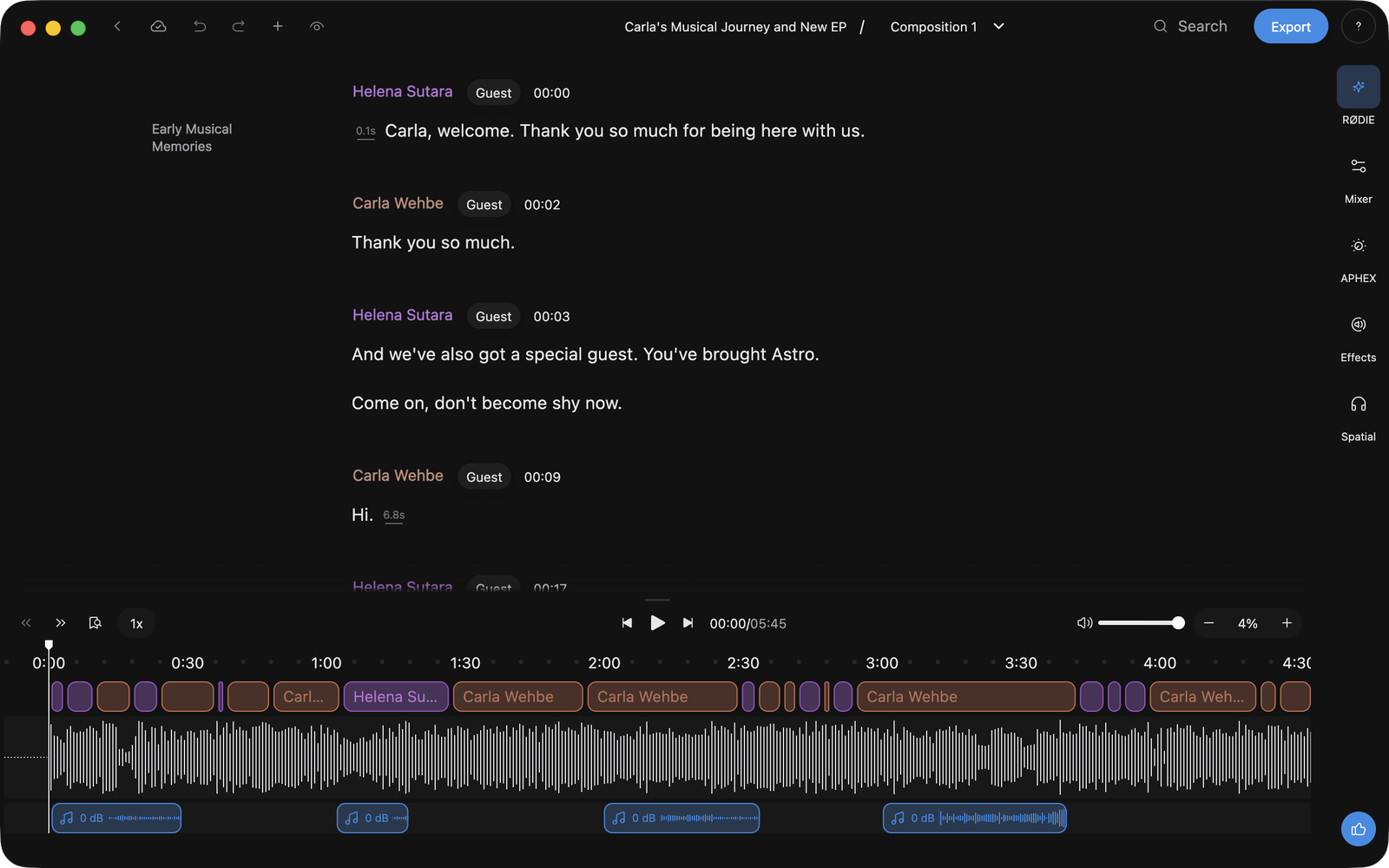
You have a recording, and you want an episode. RØDECaster Studio transcribes the take so you can edit it like a document: delete a sentence and the cut closes cleanly behind it. RØDIE, the assistant in the editor, makes those edits when you describe them.
What you can do
- Edit Like a Doc: text, not a waveform.
- Ask for an edit in words: describe it, or tap a suggested action.
- Fix a word, lengthen a pause: retype a word and hear it back in the speaker's own voice.
- Handle music: the music bed arrives already split from the speech.
- Keep versions: several edits of one recording, side by side.
- Name people once: later recordings arrive already named.
Meet RØDIE
RØDIE is the tab the editor opens on, in the panels on the right. Tap one of the Suggested actions such as Trim the beginning and end or Remove filler words, or type your own instruction and press Enter.
Edits are proposed, not made, so you get the last word. When a turn finishes, a review bar offers Discard All, Apply all, and arrows to step through them one at a time. See Review, Apply & Discard Edits.
RØDIE answers questions too: where a topic is discussed, how long a section runs, and questions about RØDE hardware.
The panels on the right change how it sounds
The tabs are RØDIE, Mixer, APHEX, Repair and Spatial; click one and its panel opens beside the transcript. For the rest of the window, see The Editor Window.
Mixer is for when one person is too quiet: a fader per speaker, and an Auto button that evens everyone out in one tap. APHEX is for thin or uneven voices: Big Bottom, Exciter and Master Compellor. Repair is the repair bench, from Breath control to Word Leveling. Spatial places each speaker on an orbit around the listener.
Your recording is never overwritten
The untouched recording is the composition called Original, and your first edit while you're on it creates a new composition and moves you there. Each composition carries its own mix, effects, spatial placement and imported clips; switching swaps all of it.
Editing is locked until you press Start Editing. Unlocking is how a recording becomes yours to work on, one recording at a time, and it sticks. Keeping audio in your library costs you nothing, and through the beta you can unlock as many as you like, free.
To compare, turn on View changes, the eye in the top bar: cut words struck through, added words highlighted. Reset, under More options on a transcript selection, returns that span exactly as recorded and stays reset tomorrow. Undo and redo only reach back through the current session.
Getting recordings in, and episodes out
A take from a RØDECaster Pro II or Duo is a file like any other: choose Import in the sidebar, or drag it onto the window. Recorded a track per microphone? Import them together as a multitrack. Sending takes across from the desk, choosing what goes over, is coming soon. Once it is in your library, the same work is there on any computer you sign in on. See Import & Upload Recordings.
Export in the editor header offers Audio, Transcript and Timeline. Pick where you're publishing from the Preset dropdown and the audio settings arrive set for it; Custom lets you set them yourself. Transcript writes TXT or SRT captions, and Timeline writes a bundle a video editor can rebuild your cut from. See Export Transcripts & Timelines.