
Local Copies & Storage
Last updated: September 2026
Your library lists every podcast on your account, whether or not its audio is sitting on this computer. Removing a local copy is not a delete: your compositions and every edit you made stay exactly where they are, and the audio comes back whenever you ask for it. To get rid of a podcast properly, see Delete, Recover & Start Over.
Spot what is on this device
In Podcasts, a podcast whose audio has been handed back has a dimmed title and a cloud icon with a download arrow. Dimmed is not broken. It just means preview only: the title and the summary are still there to read, but playing, editing and exporting need the audio here on the drive.
Free up space
Right-click a podcast in Podcasts and choose Remove copy. The same item sits on an open podcast's menu, and on Data & Storage. The confirmation names the podcast and the exact amount it frees.
If a podcast still has changes that have not reached your account, the app will not let the copy go. Leave it running for a minute and try again.
Get the audio back
Open the podcast and click Restore in the banner at the top. Leave the app open while the audio downloads, because quitting stops it. Other podcasts are fine to work on meanwhile.
The X in the banner cancels rather than pauses. It drops the podcast back to preview only, so a later restore starts from the beginning.
Read the Data & Storage page
Click your name at the top of the sidebar, then Data & Storage, to see what RØDECaster Studio is using across the drive.
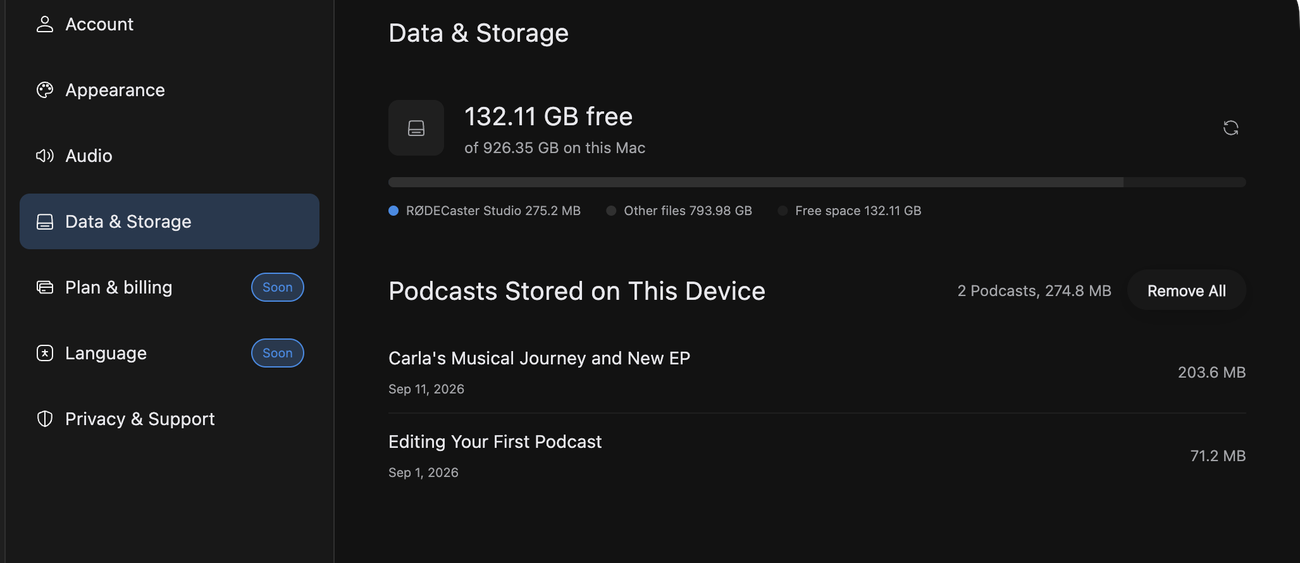
The bar across the top splits the drive between what RØDECaster Studio is using, everything else, and the room you have left.
Podcasts Stored on This Device lists a card per podcast holding audio, with its size on disk. Hover a card for its own Remove copy. A podcast made from a multitrack counts its microphone tracks in the same row, and its menu adds Remove multitrack: that frees the tracks and keeps the podcast. Restore them from the podcast page when you next want to rebalance.
Clear the drive in one go
Remove All, beside that same heading, hands back every local copy at once. It is all or nothing: if any podcast has changes yet to reach your account, nothing is removed. Only the audio goes, and your compositions and edits are untouched.
Know what signing out clears
Logging out, switching account or deleting your account removes every copy from this computer, which is why every podcast is preview only when you sign back in.