
Mixer & Speaker Levels
Last updated: September 2026
One fader per speaker
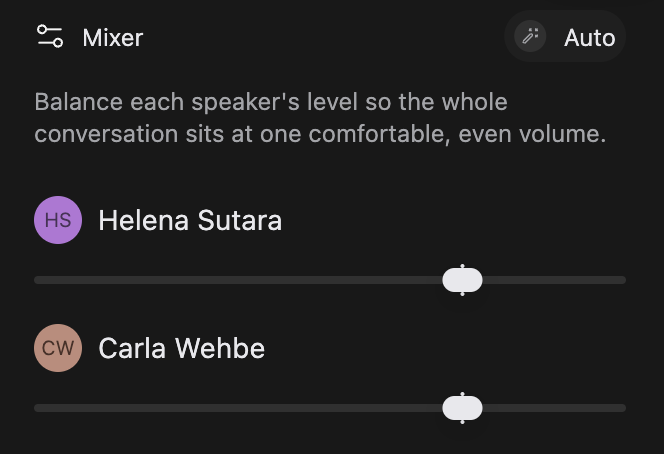
Open the Mixer tab in the panels on the right and you get one fader per speaker, one steady level each, across the whole composition.
A voice you haven't linked to a person reads Unknown speaker: see Who Is Speaking.
To polish voice tone rather than balance it, see APHEX Processing.
Set a speaker's level
Work one row at a time and listen as you go rather than aiming for a number. Keep playback running while you drag, because the change is live, and let go to set it: a drag you think better of leaves the level where it was.
A hairline notch marks that speaker exactly as recorded, and the fader snaps to it as you pass, so you can always get back to untouched.
Level everyone in one tap
Auto sits on the right of the panel's title row. It measures every speaker and sets one level each so the conversation sits at one even volume. Listen back, then hand-balance from there. Click Auto again to put your old positions back.
One thing to know first: nudge a fader by hand while Auto is on and it switches off, keeping the level you just set. Your earlier mix is gone. And that second click only works before you leave the editor: come back later and there's nothing to put back.
Reset, beside Auto, puts every fader back to exactly as recorded in one click.
Evening out words inside one person's delivery is a different feature, Word Leveling, in the Repair tab: see Repair Your Sound.
Reach a fader from the timeline
The coloured speaker blocks between the ruler and the waveform reach the same fader without opening the Mixer. Click a block, choose Adjust, drag the slider, then click away. It isn't a per-segment level: change it here and you change that speaker everywhere in the composition.
The volume slider in the playback row under the transcript does something else. It sets playback on this machine only, and turning it down won't make your export quieter.
Levels live with the composition
Every composition keeps its own levels, alongside its APHEX, Repair and Spatial settings: see Compositions & Versions. A new composition starts everyone exactly as recorded; duplicate one and it sounds like its source until you move a fader. Exports sound the way the editor does.