
APHEX Processing
Last updated: September 2026
Edit's done, but everyone still sounds a bit flat? That's what APHEX is for. Three dials, each fixing something you can hear.
It lives in the APHEX tab in the panels on the right, and it works on the finished mix rather than one person, so leave it until the cut and the levels are settled. To push one speaker up or down, use the Mixer.
Pick the dial that matches what you hear
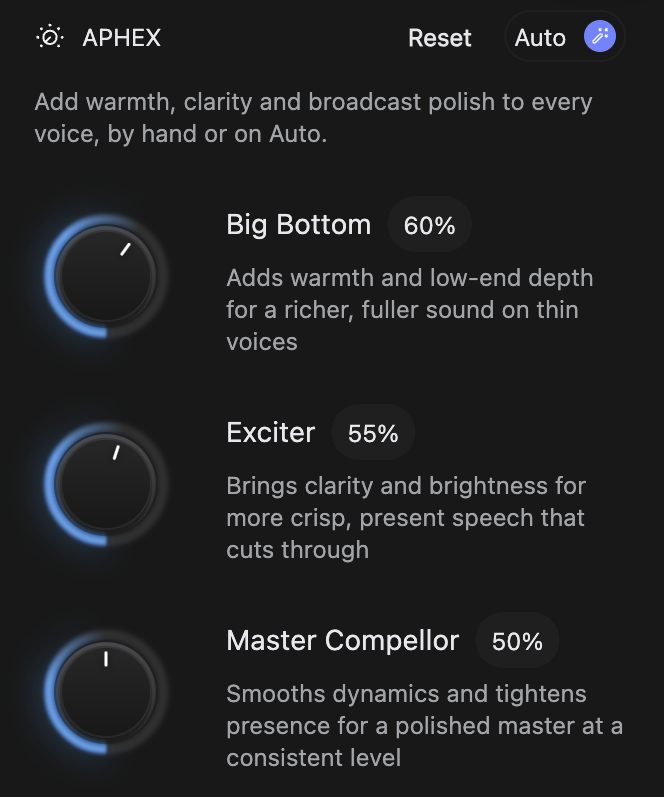
- Big Bottom for a thin, lightweight voice. It fills the voice out and gives it weight.
- Exciter for dull or buried speech. It brings the words forward so they sound crisp and present.
- Master Compellor for an episode that drifts loud and quiet. It holds everything at a steady level, so nobody reaches for the volume.
All three can be up at once, and a little does a lot. Start low and stop while the voices still sound like the people who were in the room.
Dial one in
- Click the APHEX tab to open the panel.
- Start playback on a line you know well. Every move is live.
- Drag a dial: right or up to increase, left or down to decrease.
Apply Auto Enhance in one tap
Click Auto at the right of the panel header and all three move to the settings that suit most voices. Listen to a paragraph, then adjust by hand. Click Auto again to drop the preset and get your own values back.
Put the dials back
Reset in the panel header returns all three to zero in one click.
The dials follow the composition
Each composition carries its own dial positions, alongside speaker levels, spatial placement and the repairs in Repair. Switch composition and the dials move to match it. Duplicate a cut and it starts out sounding exactly the same. Exports sound the way the editor does.
Or just ask RØDIE
If you'd rather describe the result than hunt for the right dial, ask. RØDIE can set the three dials or apply Auto Enhance: try "apply Auto Enhance", or "add a little more warmth". The dials move as it happens.