
Who Is Speaking
Last updated: September 2026
A speaker is a voice, a person is a contact
The recording picks out the voices. Linking each one to a contact in your library is what puts a name on screen, and until you do, that voice reads Unknown above its paragraphs, in the Mixer, in the Spatial panel and in every transcript export. Contacts live in People, Contacts & Voice Recognition.
Naming a speaker counts as an edit, so on a locked podcast the first attempt offers you Start Editing. Take it once and everything below works for the rest of that podcast.
Put a name on a voice
Say who a voice is once, and every paragraph it holds takes the name.
- Click the speaker name above any paragraph.
- Type into Person's name or email... to narrow the roster.
- Click the person.
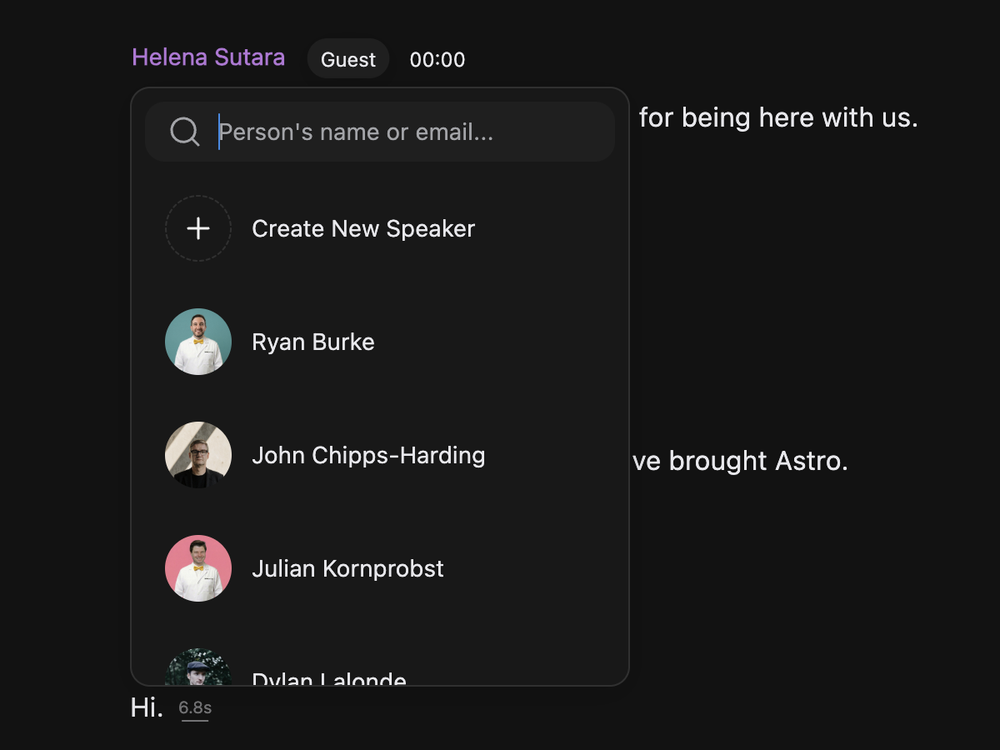
A voice holds one name at a time, so picking someone new replaces the one that was there, without asking.
Nobody suitable on the list? Type the name, click Create New Speaker in the picker, fill in First Name* and save.
Clear a wrong name
Hover the speaker name and click the X beside it. The voice goes back to Unknown, the person stays in your library, and no words or audio move. If you know who it should have been, pick that person in the picker instead: there is no need to clear the old name first.
Hand a few words to someone else
Crosstalk gets fixed on a selection, not on the whole speaker.
- Select the words that belong to somebody else, keeping the selection inside one speaker's paragraph.
- Right-click the selection, click More options, then Change speaker.
- Pick the person.
The paragraph splits around your selection: the moved words sit under their own name, the rest keeps the one it had. Words only move between people already heard in this recording, so a voice the microphones never caught will not be on that list.
The same jobs from the timeline
Open the timeline and click a block in the speaker row, the coloured strip between the ruler and the waveform. Each block is one run of talking. The menu offers Change speaker, Unlink voice and Adjust, which sets that speaker's level: the same value the Mixer fader shows, so setting it here moves the fader too.
Mark someone as a host
Once a voice is linked, a Host or Guest tag sits beside the name. Hover it and click the handle that slides in to flip the role. Everyone starts out a guest, more than one person can be a host, and making someone a host here leaves their role on your other podcasts alone.
Ask RØDIE instead
Typing beats clicking when several speakers need names. Ask RØDIE to "rename Speaker 2 to Dr Chen": it finds the voice by its current name or by the Speaker 1, Speaker 2 numbering, and creates the person if they are new.