
Breath Control
Last updated: September 2026
When the breathing is louder than the words
That's what Breath control is for. It sits in the Repair tab in the panels on the right, alongside the repairs in Repair Your Sound.
A level changes how loud each breath is, never how long, so your pacing survives. And every breath is reviewable on its own, so a deliberate gasp can stay while the rest come down.
Set a level for the whole episode
Breath control gives you three strengths. Start at Light, listen back to a passage where the breathing is obvious, and step up from there. Bring the breathing down rather than out: the same restraint that keeps a bit of room noise in a recording applies to breaths too.
The first time you pick a level, the app has to find every breath first. The panel shows how far it has got and roughly how long is left, with Cancel beside it. On a two-hour episode that's a few minutes: pick it, leave it, and come back to the breathing already down.
Picking a level from Original starts a new composition, so the untouched recording is still there to go back to.
Review breaths one at a time
Every breath in the transcript is marked with a small wind icon. Hover one to see how long it is, and right-click or double-click it to open its review toolbar.
To walk the episode instead of hunting markers, use Breaths found under the level control. It shows the breath you're on out of the total, and the up and down arrows step through them in transcript order.
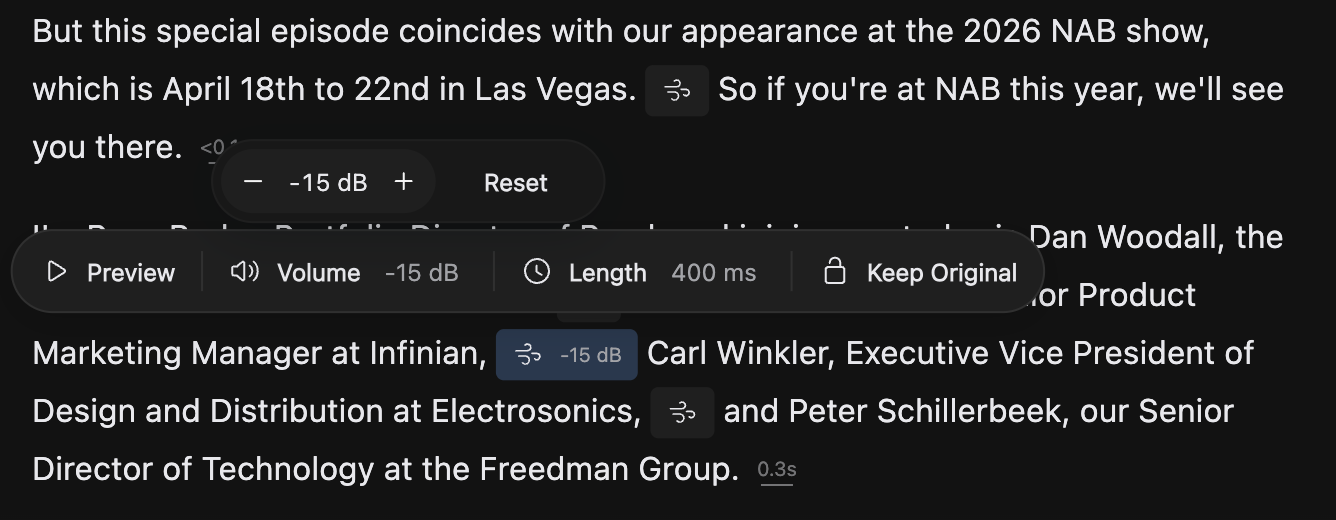
On the toolbar, Preview plays the breath in context. Volume and Length show where that breath stands now. Click either for a counter: − takes it quieter or shorter a step at a time, + gives it back, and Reset returns just that one to how you recorded it.
Volume and the levels leave your timing alone. Length removes time, so the composition gets shorter: the one place breath work changes the length of your episode.
A breath you set by hand stays where you put it, and later levels leave it alone. Its marker widens to say what you did, such as -100 ms and -15 dB, so your own decisions are easy to spot as you scroll.
Keep a breath exactly as recorded
Some breaths are performance: a gasp, or a sharp pull before a punchline. Open that breath and click Keep Original. It goes back to how you recorded it, a padlock appears on its marker, and no level touches it. Click Keep Original again to hand it back to the level.

Put every automatic reduction back
Click Off and every automatic reduction across the composition comes out in one undoable step. Your own decisions survive it: hand-set volumes and lengths and kept breaths all stay put. To undo one of those, open it and use Reset in its counter.
Where breath decisions live
Breath work stays with the composition you're editing, and a duplicate starts out sounding the same.
Right-clicking a podcast in your library and choosing Reset clears your breath work along with every composition and edit, and the next level you pick starts the few-minute wait over. That cannot be undone.