
Spatial Audio
Last updated: September 2026
Spatial seats each speaker somewhere around the listener instead of flat in the middle, so a conversation sounds like a room rather than a single point. The output is binaural, so wear headphones while you place people and check the result. Everyone starts at 0 degrees, dead centre, so the mix sounds unchanged until you move somebody off it.
Seat people around the listener
Open the Spatial tab in the panels on the right (The Editor Window covers the panels).
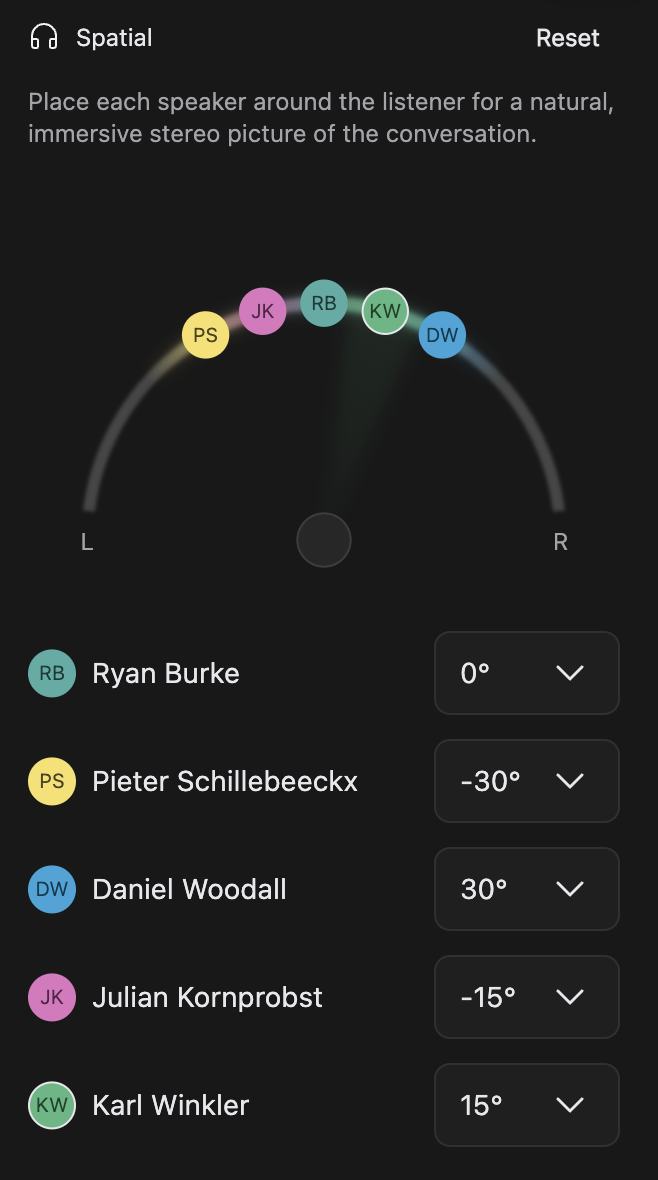
The listener is the disc at the bottom centre, with the orbit ring curving above it: L at the left end, R at the right. Drag a speaker's avatar along the ring and the sound follows as it moves.
The ring stops at 45 degrees each side, and that limit is doing you a favour. Pushed wider, a voice starts to sound off-mic rather than seated, and the placement collapses badly the moment someone plays your episode in mono, which is what most phone speakers do.
Selecting a speaker in the rows below brings them to the front, separating overlapping avatars. For a named angle rather than a feel, click the dropdown in a speaker's row and choose one. Negative is left of centre, positive is right. Ring and dropdown are one setting shown twice. The list comes from the voices heard in the composition, so a voice not yet linked to a person sits there as Unknown speaker until you link it: see Who Is Speaking.
Read the ring during playback
Each speaker's light on the orbit is their live level meter, in their identity colour, spreading outward along the ring. So you can see who is talking, how hard and from where.
Send everyone back to the centre
Reset, on the right of the panel's title row, returns every speaker to 0 degrees at once, and the room flattens back to the middle. It is not in the transcript's undo history, so changing your mind means placing people again by hand.
Placement travels with the composition
Each composition keeps its own seating, alongside its Mixer, APHEX and Repair settings, so another version of the same episode can seat people differently: see Compositions & Versions. Duplicate it and everyone keeps their seat, so the copy sounds the same. Exports sound the way the editor does, so tell your audience to listen on headphones. See Export & Publish.